Google Business Profile Optimization
Overview
Google Business Profile (GBP) Optimization is a service where a team of listing specialists creates and claims your business listing, guides you through Google's verification, then maintains and optimizes the profile every month.
What to expect next: order confirmation → completed fulfillment form → profile creation and claiming → you complete Google's verification with our guidance → ownership transfer → initial optimization → monthly updates and posting.
Google requires the business owner or an authorized representative to complete verification directly. Our team cannot verify the listing for you—Google's methods (video, phone, postcard, email) are tied to the business itself. What we do is set everything up, tell you exactly what Google is asking for, and stay with you until you're through it.
What's Included
- Google Business Profile creation, claiming, and initial setup
- Dedicated, hands-on support through Google's verification requirements
- Complete ownership transfer and dashboard connectivity
- Ongoing monthly profile updates and content posting
Once the listing is verified and ownership is transferred to our team, the service includes a one-time initial optimization plus an ongoing monthly service with two main components: monthly profile updates and content posting.
Initial profile optimization
Once the listing is successfully claimed, the team performs an initial optimization so the profile is accurate and complete. This includes:
- Confirming business name, address, phone number, website, hours of operation, and category.
- Adding a logo, cover photo, up to 5 videos, and up to 5 photos.
- Adding highlights, amenities, attributes, and service options where applicable.
You will receive a confirmation email within 2 business days after this work is completed, letting the contact on the fulfillment form know the GBP is claimed and monthly optimized service is beginning.
Monthly profile updates
Once per month, our team logs into the Google Business Profile to:
- Ensure all information remains accurate.
- Manage edits you provide, including uploading new photos and videos.
- Work to lift listing suspensions so you can maintain your online presence.
Tell us as soon as possible about any changes to business name, address, or phone number. If we are unable to recover a suspended listing, we may work with you to create a new listing. A new listing can still face suspension due to association with a previously suspended listing.
Monthly content posting
Once per month, a service-based post is published to the listing. The post appears on the knowledge panel in Google Search results. Posts are keyword-rich and focus on high-value services your business offers.
- Posts include a call to action, such as Book, Order online, Buy, Learn more, Sign up, or Call now.
- Content is based on relevant information and links from your business website.
- Images may come from a stock image site or your business website.
- You can supply specific images or content you want posted.
Timeline: These monthly components are completed by the end of each month.
Social Marketing and posting
GBP Optimization monthly posting is fulfilled through Social Marketing. Social Marketing Standard is activated at no charge for the duration of an active GBP Optimization subscription if you do not already have a paid edition active.
If you cancel GBP Optimization, we will notify you before ending the complimentary Social Marketing instance. If you want to keep Social Marketing, it can stay active and you will see Social Marketing charges starting in the next billing period.
If listings are found to be in violation of Google’s guidelines, they may be removed without warning. If fulfillment work has not yet begun, a full refund may be issued. If fulfillment has already been completed, no refunds are issued. It is the business owner’s or agency’s responsibility to submit listings that comply with Google’s guidelines for account eligibility.
Prerequisites
Eligibility: Businesses that serve customers in person—from a storefront or in a service area—are generally eligible, including businesses with existing listings that need re-verification or reinstatement. Not eligible: rental or for-sale properties, lead generation companies, brands/organizations/artists, and online-only businesses (including e-commerce). It is your responsibility to ensure businesses you ask us to claim meet Google’s guidelines for representing your business online. We reserve the right to refuse service for businesses that are not eligible.
How to prepare before claiming starts:
- If you already have access to a listing, you can add listings@yourdigitalagents.com as an owner in advance (see If you already have access). If you're not sure how, ask us and we can walk you through it.
- Prepare business documents Google may require (for example a business license or utility bill) and provide them when asked.
- For a new listing claim, complete the fulfillment form as soon as possible with at least: business name, address, phone number, logo, cover photo, business description, hours of operation, and an email to add as an owner of the listing.
- P.O. boxes cannot be used when claiming GBP listings.
- Have someone available to verify. Google's verification has to be completed by the business—keep someone available who can answer the primary business line, record a video of the premises, access an email address at your business domain, or read the postcard PIN, depending on what Google offers.
Getting Started
1. Submitting your information
When you purchase GBP Optimization, the Listing Fulfillment team receives your fulfillment form and works to verify the listing using the information provided.
- Timeline: We review the order and start the process within 2 business days. Initial fulfillment work is completed within 2 business days of receiving a fully completed fulfillment form.
- Attempt to verify: The team attempts verification with the information in the form within 48 hours of receiving it (where the process allows).
If information is missing from the form, the overall process will be delayed. After you receive your confirmation email, provide any missing information promptly so work can continue.
2. Listing claim and verification
Fulfillment can follow several paths depending on your situation. The most common are a brand new listing claim, gaining access to an existing listing (you have access, or you do not), and reinstating a suspended listing (when you have access).
Brand new listing claim
Our team creates the new listing from your fulfillment form. As part of this we add the business name, address, and phone number, plus a logo, cover photo, up to 5 photos and 5 videos, and—where applicable—highlights, amenities, attributes, and service options.
Google then requires you to complete verification. Our team tells you which method Google has offered, walks you through exactly what to do, and is available while you work through it—but the steps themselves have to be completed by someone at the business. To avoid delays, act on verification requests as soon as they arrive. Methods can include:
- Video verification: You may need to provide a video of unlocking the physical location or cash register. For service area businesses, videos may need to show tools, equipment, and assets used to provide services. In some cases, Google may require a live video call.
- Phone call / text message: Google sends an automated call or text with a PIN to the business phone number.
- Postcard: A physical postcard with a PIN is mailed to the business’s physical address. This can take two weeks or more and is a very common method.
- Email: Google sends a PIN to an email address at the business domain (for example
...@yourbusinesswebsite.com).
Please note:
- You may need to verify with more than one method, and verification may be required more than once.
- The available methods depend on many factors (Google cites business category, public information, region, and more).
- We do not have visibility into which method Google will offer, and we cannot control, change, or complete the methods on your behalf. Whatever Google offers—including video verification and live video calls—has to be completed by the business.
- If there is a suspension on the listing or additional verification is required, the timeline may be delayed.
Timeline: This step often takes two weeks or more, depending on how quickly information is provided and on Google’s processes. Most new claims take less than a week, but the process can take a month or longer if there is significant back-and-forth with Google.
If you already have access to the listing
Add our team so we can manage the profile:
- Open your business profile, open the kebab menu (three dots) next to Profile strength.
- Go to Business Profile settings → People and access → Add.
- Add listings@yourdigitalagents.com as an Owner or Manager.
Without Owner access we cannot add other users to the profile.
If the listing is claimed and you do not have access
If the GBP is already claimed and you are not the owner, we can work to have the listing unlocked so it can be claimed again. Typical steps:
- The platform often has a Request ownership (or similar) flow that notifies the current owner.
- If the current owner denies the request, we may need to work with Google Support; we cannot guarantee ownership.
- If the current owner does not respond within 3 business days (where that rule applies), the listing may be claimed using the same verification methods as in a brand new listing claim.
This process often takes two weeks or more. Due to reliance on Google Support, we cannot guarantee the listing can be claimed this way.
Reinstating a suspended listing
To start reinstatement, follow the steps above to add listings@yourdigitalagents.com as an owner on the listing. Once we have ownership access, we work with Google Support.
Helpful to prepare in advance (Google often asks for at least one of these, plus verification):
- An official document with business name and address (for example a business license or utility bill).
- Photos of the storefront, ideally with a street sign visible.
- Photos inside the business that support ownership (for example from behind the counter).
- For service area businesses, a video of tools and equipment used for your services.
This process can take two weeks or more. We cannot guarantee reinstatement. If the listing is suspended and neither you nor your business have access, it may not be recoverable through Google Support.
3. Ownership transfer and dashboard connectivity
Once the profile is verified, we complete the handoff so the listing is fully yours and fully managed:
- Ownership transfer: ownership of the Google Business Profile is settled in your business's name, with our team added at the access level needed to manage it month to month.
- Dashboard connectivity: the profile is connected to your dashboard, so profile data, insights, and reviews flow into the same place you track the rest of your online presence.
With ownership settled and the profile connected, initial optimization begins—see Initial profile optimization.
Multi-location and bulk verification (10+ locations)
For 10 or more locations, we can pursue bulk verification with Google. Before requesting multi-location claiming, confirm that:
- Your spreadsheet includes 10 or more locations for the same business.
- It includes all locations for that brand you want on this account.
- Your business is not in Google’s restricted verticals.
- The business is not a service area business (for this bulk flow).
- A verified account does not already exist for this use case.
Client expectations:
- Provide a branded email and password under the brand’s domain (for example
locations@yourbrand.com). Do not attach a recovery email or phone to that Gmail, or sign-in for our team can fail. - Complete the team’s spreadsheet with each location: business name, address, zip, phone number, website, and category. If some rows are already claimed, only claimable listings will be processed after upload.
What our team does: We sign in, create a Google Business Profile location group, import the spreadsheet (Add business → Import businesses → select the file), align primary categories across locations, and submit a bulk listing verification request. Google reviews the request against quality guidelines and may email with questions. Google may still require individual verification for some or all locations.
FAQ
Eligibility and business type
What types of businesses are eligible for this service?
Businesses that serve customers in person—from a storefront or in a service area—are generally eligible. This also includes businesses with existing listings that need re-verification or reinstatement, provided they follow Google’s guidelines.
Businesses that are not eligible include rental properties, lead generation companies, and online-only businesses, including e-commerce. See also the FAQ on what type of business cannot be claimed with this service (below).
What type of business cannot be claimed with this service?
Examples of businesses that are not eligible for a Business Profile include:
- Rental or for-sale properties (vacation homes, model homes, vacant apartments, etc.)
- An ongoing service, class, or meeting at a location you don’t own or aren’t authorized to represent
- Lead generation agents or companies
- Brands, organizations, or artists (as described in Google’s rules)
- Other online-only businesses, including e-commerce
For the full list, see Google’s guidelines for representing your business online.
Can you claim a listing for a business that is still under construction?
Usually, listings cannot be created until the business is open and ready to receive customers. Occasionally Google allows a listing within about three months of the opening date. Contact your services representative before ordering if this applies.
I run two different businesses with the same phone number and address. Can you claim both listings?
Identical address and phone can be treated as duplicates. If you can provide two separate business licenses, Google may allow two listings—this is not guaranteed.
Claiming, ownership, and verification
Can you verify the Google Business Profile for me?
No—Google requires the business itself to complete verification, and there is no way for us to do it on your behalf. Google decides which method you get (video, phone, postcard, or email) and ties it to the business location, phone line, address, or domain.
What we do handle: creating and claiming the profile, telling you exactly what Google is asking for and how to complete it, staying with you through repeat or multi-method verification, and taking over ownership and management once you're verified. See You complete the verification.
Who needs to be available for verification?
Someone at the business who can act on Google's request: answer the primary business phone line for a PIN call or text, record or join a video of the premises, access an email address at the business domain, or receive and read the postcard PIN. Verification can be required more than once, so keep someone available until the profile is verified.
What happens if someone else already owns the business listing?
If the listing is already claimed by another owner, we can request ownership and work with Google Support to gain access. If access cannot be gained, we will discuss next steps with you. See also If the listing is claimed and you do not have access above.
How long does the claiming process take?
While most new claims take less than a week, the process can take a month or longer if there is significant back-and-forth with Google. Work may be discontinued after three months of attempts, or after repeated unsuccessful communication.
What is the status of my Google Business Profile verification? Is my verification complete?
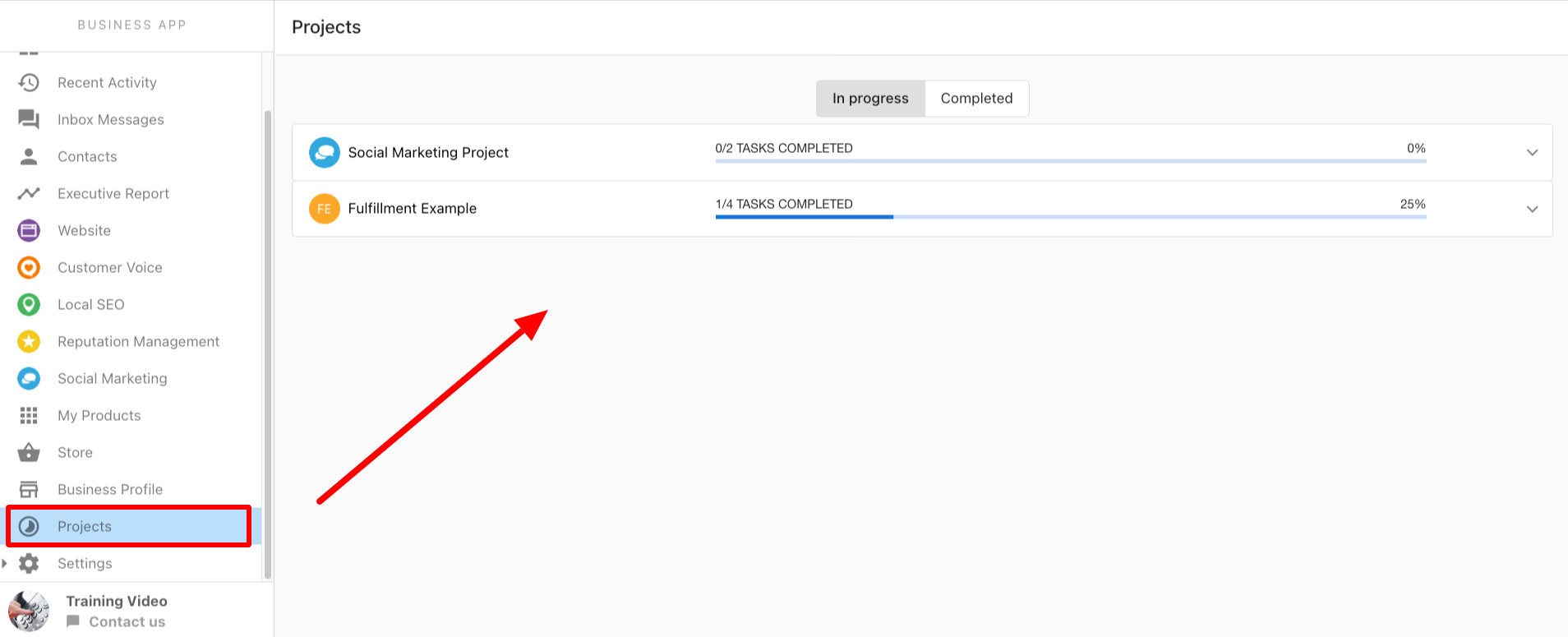
You can view status in the Projects tab of your dashboard: in-progress and completed work, plus notes from our team (including verification issues or Google support tickets).
Will you create a profile image and cover image for my business?
No. You must provide these images (for example via the fulfillment form—see the FAQ on how to send images to the team, below).
When will my listing be complete?
Most new claims finish in under a week, but complex cases can take over a month. Work may stop after three months of attempts or after repeated unsuccessful communication.
I made an edit on my listing but I’m not seeing the changes. Why?
Edits can go through manual review, which delays publication. Most edits appear within about 3 business days. Warning: Editing a profile can trigger re-verification or suspension. Reinstatement is not guaranteed.
Suspensions and Google Support
What happens if my business listing gets suspended?
Edits can sometimes trigger re-verification or a suspension. If a listing is suspended, our team works with Google to have it lifted. There is no guarantee Google will reinstate the listing. Google does not always explain why profiles are suspended or how tickets are triaged—we share updates as we receive them.
See Reinstating a suspended listing above.
Why was my Google Business Profile suspended?
Google often does not provide clear reasons for suspension or unverified status. We work with them on open requests and pass on what we learn, but we can only be as transparent as Google is.
What is the process for reinstating a suspended listing?
Same as the suspension handling above: we work with Google; reinstatement is not guaranteed. If you have access, add listings@yourdigitalagents.com as owner and gather documents and media that Google commonly requests.
What’s the status of my Google support ticket? When will it be resolved?
Google does not publish reliable SLAs. For new support or reinstatement requests, we often hear within 3 to 7 business days. If there is no response after 7 business days, we typically open a new ticket. For long-running tickets with no movement, we may need to submit a new request.
Can I be added to the Google Support ticket?
We are trained to work tickets efficiently with Google. We do not usually add other stakeholders; we can on request. We forward updates as we receive them.
How does multi-location and bulk verification work?
For 10+ locations, we can request bulk verification per Google’s bulk verification process. Requirements include a spreadsheet, a branded domain email, and rules such as not using a service-area business model for this flow. Google may still require per-location verification. See Multi-location and bulk verification above.
Posts, content, and attachments
How do you decide what to post on the business profile?
Posts work well for services, promotions, or events. Tell our team if you have specific content; otherwise we use relevant content from your website (see Monthly content posting).
How do I send images to the team?
Use the fulfillment form to send profile and cover images. For all other images, email marketingservices@yourdigitalagents.com.
What business types or categories don't have access to Google Business Profile posts?
Examples include:
- Adult Entertainment
- Camps
- Cannabis shop
- Casino
- Conference Center
- Gun Shop
- Hotel (all hotel categories)
- Vacation Rental
- Wine Store (and other alcohol-related categories)
If needed, where should I upload attachments for my order?
Upload attachments in the attachments section of the fulfillment form, or email them to marketingservices@yourdigitalagents.com so our team can access everything needed.